I thought this thread would be over after I reinstalled my swap drive using the new adapter; however, due to another fault, there is now a bonus round. 😡
There aren’t many parts on the PCB, but there is a voltage regulator (U1) and two caps (C1 & C2). C1 & C2 are much-much smaller on the new version – I haven’t measured their values, but based on the size difference, I’m guessing the capacity of the new ones could be less than 1/10th of the original ones…. 😟
While these are only filter/bypass caps whose values are not that crucial, there is a point when they become too small. I’ve had 3 BSODs in about 3 weeks with the new adapter, and I’m now convinced that this happened because of the insufficient filtering. See: https://broadbandbulletin.com/d/5205-kernel-data-inpage-error
I know how to fix this adapter in theory (just add more capacitance or replace the caps with bigger ones) but given the preexisting constraints, plus because I have no suitable caps on hand, that’s easier said than done.
I wrote an email to the seller via eBay telling him about this defect, and amazingly he’s replying back, but now asking for things that cannot be done – A+ for the effort, but C- for some of the additional things he wants me to verify.
Thank you so much for sharing the detailed usage of the old adapter, the BSOD issue with the V6 version, and your key observation on the capacitor size difference—this information gives us a clearer initial understanding of the problem. To 100% accurately identify the root cause and provide you with a solution that better meets your needs, we would first like to invite you to assist with two simple tests (the steps are not complicated and won’t take much time):
The first is the cross-replacement test (the most direct and effective one): Could you please use the old adapter and the V6 adapter alternately on the same computer with the same SSD? If after switching back to the old adapter, there is no BSOD for 1-2 consecutive weeks and the SSD’s read/write speed remains stable; but when you reinstall the V6 adapter,
I mentioned in my first message to the seller that I got a new adapter because the old one broke….
BSOD occurs again within 1-3 days (or errors are detected by a hard drive tool), we can clearly confirm that the fault is indeed caused by the reduced capacitor size of the V6 adapter (unstable power supply or signal interference), rather than other hardware issues.
The second is the hardware parameter auxiliary verification (optional, if you have basic tools): If you have a multimeter or hard drive testing software (such as CrystalDiskInfo, HD Tune) on hand, you can add two small tests: Use a multimeter to measure the 12V/3.3V power pins of the adapter’s Mini PCI-E interface. If the voltage fluctuation of the V6 adapter exceeds ±0.2V (while the old adapter has smaller fluctuation), it can directly prove that the capacitor’s filtering capacity is insufficient. Or use the “Error Scan” function of HD Tune—if the V6 adapter shows warnings or bad sectors (which the old adapter doesn’t), it can further confirm data read/write errors caused by signal interference.
The “voltage fluctuation” he mentions is called noise on the power lines, and can only be measured with a scope or something comparable given that this is a fast digital circuit.
The caps in question:
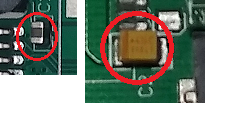
I don’t know how exactly this circuit was designed, but in the original one the designer was clueless about the mechanical aspects; however, he used properly sized bypass caps on the power lines, possibly copying it from some reference design.
For V6, the mechanical design was fixed and fine, but the electrical specs were mostly ignored – either because of the tighter board space, or because the smaller caps were cheaper. Or both.
I actually noticed the smaller caps when I received the boards, but I figured that they are usually not that important. Apparently, they are important in this case.


