I’m having a problem with very slow page loading. It’s not my ISP, because I’ve tested
the raw speed and on two networks: Xfinity cable and Verizon FIOS. It also seems that
the more complex the page, the slower it loads.
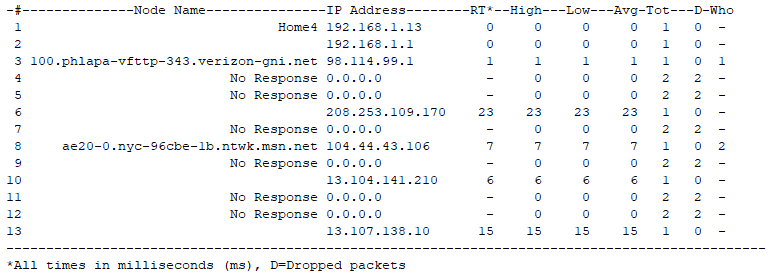
Here is a traceroute from my computer (Home4) to a destination (Microsoft SharePoint)
In between nodes, there are the “No Response” nodes that delay the trace until they
time out. If this is the pattern when requesting a page to be loaded from a server,
it could explain why it would load so slowly. And the more requests on the page, the
slower it would be.
-#————–Node Name—————IP Address——–RT*–High—Low—Avg-Tot—D-Who
1 Home4 192.168.1.13 0 0 0 0 1 0 -
2 192.168.1.1 0 0 0 0 1 0 -
3 100.phlapa-vfttp-343.verizon-gni.net 98.114.99.1 1 1 1 1 1 0 1
4 No Response 0.0.0.0 - 0 0 0 2 2 -
5 No Response 0.0.0.0 - 0 0 0 2 2 -
6 208.253.109.170 23 23 23 23 1 0 -
7 No Response 0.0.0.0 - 0 0 0 2 2 -
8 ae20-0.nyc-96cbe-1b.ntwk.msn.net 104.44.43.106 7 7 7 7 1 0 2
9 No Response 0.0.0.0 - 0 0 0 2 2 -
10 13.104.141.210 6 6 6 6 1 0 -
11 No Response 0.0.0.0 - 0 0 0 2 2 -
12 No Response 0.0.0.0 - 0 0 0 2 2 -
13 13.107.138.10 15 15 15 15 1 0 -
*All times in milliseconds (ms), D=Dropped packets
If this analysis makes sense, what are the No Response nodes, where are they coming from
and how can I get rid of them?